

Last Updated on July 1, 2025 by George Pavlopoulos
Bluehost is one of the biggest web hosting providers in the world. I’ve been using Bluehost to run my blog for several years, and I thought it would be helpful to write down my experience so far, along with the pros and cons. In this Bluehost review, I also want to advise people on selecting their hosting plan and how to maximize its benefits.
That said, I will try to make this Bluehost review as thorough as possible without getting too technical. I know how difficult it is for beginner bloggers to make the right choice for hosting their blog, so I will analyze what’s truly important. Advanced bloggers or site owners will also find helpful information, but the chances are that they already know most things.
Bluehost offers three different hosting plans: Shared, VPS Hosting, and Dedicated Server Hosting. I will focus mainly on shared hosting in this article because that’s what I use. However, I will also add some paragraphs for the other two options.
So, let’s start with the Bluehost review and see if their web hosting services are good or not.
*Some of the links are affiliate links. This means that if you make a purchase, I may earn a small commission at no additional cost to you. This is not a sponsored review.
Bluehost Review: Pros and Cons

Bluehost Review: The Pros
So, I’m starting this Bluehost review with the pros. If you are searching for the best hosting provider for a blog, you should keep these things in mind. The reason is that you will have to compare most of these things to decide what suits you best.
As a rule of thumb, since the website will be your “baby,” try to choose the best, not just the cheapest. This doesn’t mean that a cheap option is not good; however, you should not let pricing guide you. Most providers have similar prices anyway, but always keep in mind that you’ll stay with your provider for a couple of years.
Bluehost shared hosting pricing
Bluehost is popular among bloggers and website owners because of its pricing policy. Back in the day, when I was also searching for the best web hosting provider for WordPress, I came across several companies. I wouldn’t say that Bluehost was the cheapest option, but it was definitely among the most affordable ones.
I know that pricing worries most of you greatly, and it’s understandable. After all, you are about to invest in a service and embark on a journey to the unknown. However, in blogging terms, a trip to the unknown could also translate to a significant financial loss depending on your niche. Therefore, you want to be sure that you are making the right decision.
First, let me explain what shared hosting is. As the name suggests, shared hosting means your blog or website will be hosted on a server with other sites. Sharing a server with dozens of different websites might not sound very convincing, but remember that you are (probably) just starting your journey, and you should keep an eye on expenses.
There are options like VPS hosting or dedicated hosting, but these come at a price, and you won’t need them unless you experience excessive traffic. Therefore, shared hosting is the ideal option if you are just starting a blog or website.
Bluehost’s shared hosting prices are fair. They usually start at around $ 7/€ per month, and the price increases depending on the extras you add. However, there’s currently an offer available, and you can receive up to a 60% reduction on every plan. So, instead of 7.25 €, you’ll pay 3.58 €.
Please check the current prices by following the link above.
Bluehost Review: Plan Comparison. Which plan should you choose?
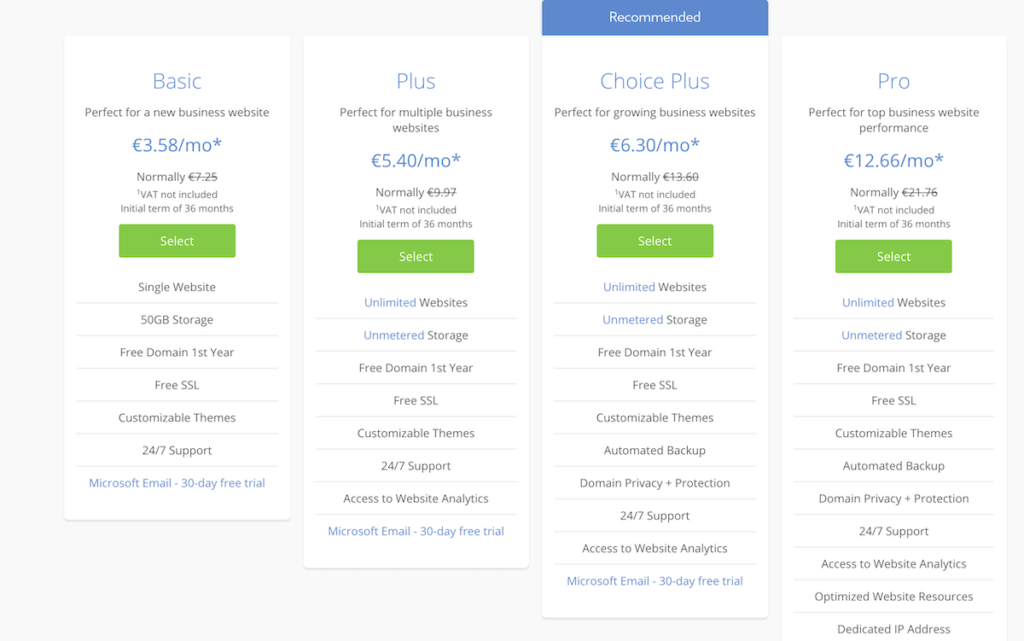
Before proceeding with the Pros and Cons of this review, I would like to offer you some advice. You are probably considering which Bluehost hosting plan to purchase. Well, the obvious reply would be the cheaper one. And the truth is that if that’s what you can afford, then the conversation is over.
The so-called Basic Bluehost option provides 50 GB of storage and the ability to create one website. Both of them are really enough when you are just beginning. If you need more at any point, you can upgrade at any time.
From my side, I preferred Choice Plus for two reasons: a) because it offers unlimited storage, and b) because I wanted to transfer my Greek website to Bluehost as well (which allows unlimited websites). Additionally, this plan included an automated backup, even though I was already backing up my website with extra software.
Long story short: the Basic option is fine, while the Choice Plus will give you more breathing space.
I didn’t consider the Plus because the price difference to Choice was slight, while the Pro was out of my budget. Remember that the best Bluehost plan is always the one that a) satisfies your needs and b) you can afford.
Free Domain Name for one year and Free SSL
Although that’s usually the rule, it’s still not something to disregard. Bluehost offers a free domain name for the first year in all its shared hosting plans. The cost won’t exceed 15 euros per year, but it’s still nice to cut down on expenses.
The Free SSL (the recommended security protocol) is also included in the price you’ll pay, and honestly, I find it more important than the domain name.
Bluehost Review: How about Speed and Uptime?

Regarding websites and blogs, speed and uptime are two of the most critical factors. The speed is crucial because it affects how quickly your website loads. As for uptime, this refers to the frequency at which your website is unavailable and, therefore, inaccessible.
A site often inaccessible to visitors or too slow to load can be why your blog might fail. Of course, there are other factors to consider in the field of speed, such as optimizing your images, but the truth is that you’ll need a good starting point for your website.
A quick Google search (as shown in the screenshot) indicates that Bluehost’s uptime is 99.99% and its load time is 405ms (approximately 0.4 seconds). As you can imagine, 0.4 seconds is pretty fast, even though dedicated hosting servers can be even quicker.
That said, the server response time of Bluehost is perfect. As for uptime, the 99.99% score means that your website will likely never be down. Most providers usually try to score 99%, but 99,99% is definitely impressive.
Bluehost has excellent customer support
Please do not underestimate that. It doesn’t matter whether you’re starting your journey in the blogosphere or have been around for a while. You’ll always have questions that you won’t be able to answer on your own, or you’ll need help with the technical aspects of your website.
For example, it might be easy for an experienced user to access the .htaccess file or update an expired protocol. But that’s not the rule. So, all I’m saying here is that, regardless of which web hosting provider you choose, you should ensure they offer good customer support. The chances are that you will need it more than once.
Now, when it comes to customer support, you will read contradictory reviews. On the one hand, that’s human nature, but on the other hand, satisfaction always depends on expectation.
From my end, I must say that I’m delighted with Bluehost’s customer support. There are two options to reach them: via phone call and live chat. Since I’m not living in the States, I never used call support because it comes at a price and would be expensive. However, their live chat is available 24/7, and it’s a brilliant way to resolve your issues.
I have used Live Chat more than a dozen times throughout the last couple of years. The employees are all knowledgeable, and 9 out of 10 times, they solved my requests in one session. The one or two times when they couldn’t solve everything straight away, they kept my email, did the necessary things, and contacted me within an hour or so to let me know everything was running smoothly again.
My issues varied: from an idiot mirroring my website somewhere in Southeast Asia to updating a protocol, from accessing a hidden file in the root directory to questions about extra services. Even when I accidentally broke my site after installing AMP (hint: it’s not that easy), Bluehost’s customer support team solved everything.
Overall, I’m delighted with their customer service. The Live Chat might sometimes be laggy, but it’s nothing that bothers me with the service I get. Kudos, Bluehost.
Bluehost is an official WordPress Recommended Host
Bluehost is one of the top 20 web hosting providers globally. They are running more than two million websites. Since more than 30% of sites are running on WordPress, it is understandable why Bluehost is one of the recommended hosts. WordPress wouldn’t give that badge so easily after all.
Bluehost offers a speedy, one-click WordPress install after you sign up for any plan. The process is straightforward. Literally, a few minutes after signing up, you will enjoy a managed WordPress hosting experience. But, of course, it takes more to create your website (see how you can start a blog in half an hour).
Bluehost’s simple interface and ease of use
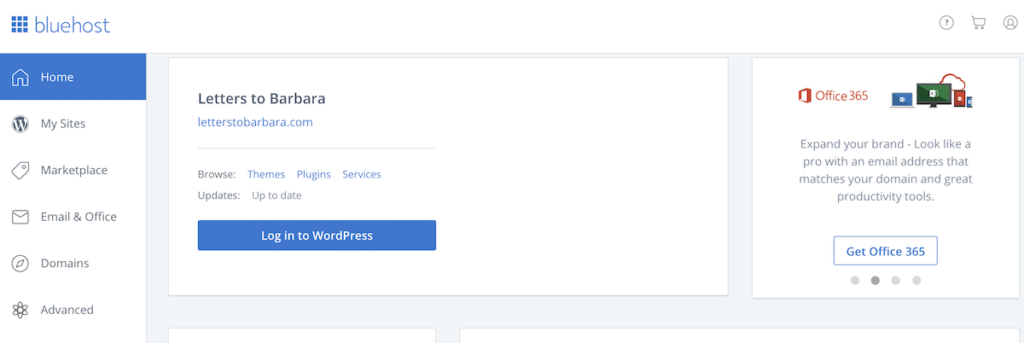
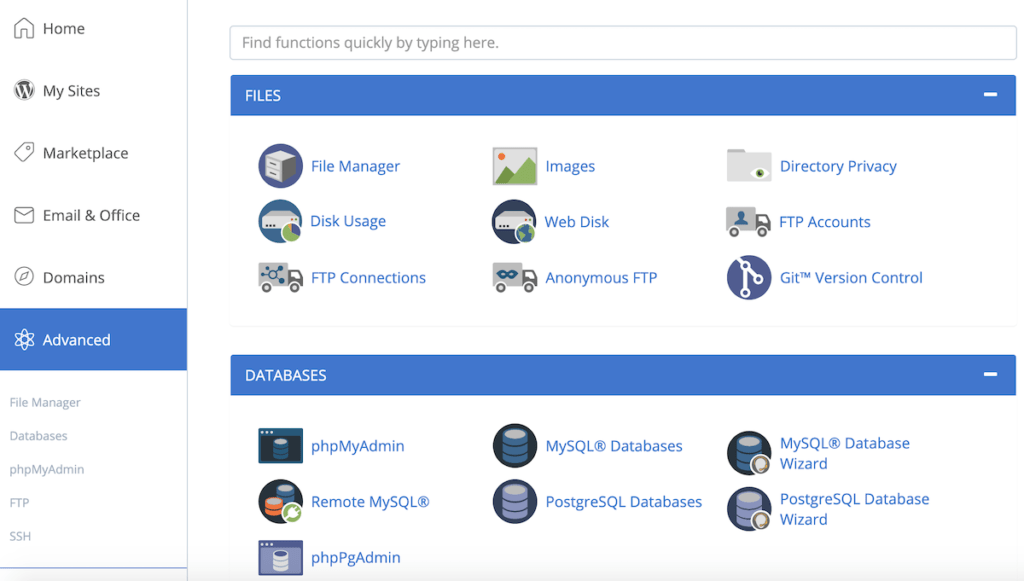
A simple interface is important for beginner bloggers who might have more questions than knowledge. As you can see in the screenshot above, the interface is simple. You can easily navigate through the menu, access the files you need, and change your options.
I have seen other web hosting environments, but I have never used them so far. Before Bluehost, I only worked with Squarespace, which is also easy to navigate but lacks features. Switching to Bluehost was the right decision.
I’m not a professional in terms of technical knowledge; therefore, I needed something that wouldn’t make my life difficult. I’d rather focus on writing and not navigating through folders perpetually.
With Bluehost, I can say that I’m pleased with their control panel. After the first two to three weeks, I knew where everything was. And if I wanted extra guidance, the Live Chat support was always there.
Bluehost backs up your website (and here’s the proof!)
Do not underestimate the fact that Bluehost backs up your website. It actually does this often, and I have proof about that.
This means that your entire database is backed up periodically. So, your files, images, and hard work are indeed in good hands. While you can use a plugin to back up your blog or website (like Updraft Plus), it’s always good to know that your host actually stores your files in a secure place. Why is this important? Well, if you accidentally break your website, you don’t want to lose everything.
While it might sound amateurish, breaking your website is something that can happen. For example, a theme update has destroyed the website you read, even though they said it was okay to proceed. The homepage disappeared, and the articles seemed all over the place.
As you can imagine, I freaked out. However, after contacting Bluehost support, the representative informed me that they had performed three full database backups within the last twenty days.
It was such a relief. Within 36 hours, Bluehost restored the entire website, and everything ran smoothly again. That said, it shouldn’t be just a vague claim that your web hosting provider backs up your site. It must be a valid statement.
From the technical point of view, that’s a key element when deciding the best web hosting provider for you.
Bluehost Review: The Cons
Now, as you can easily imagine, there are always some cons. Therefore, I will record my experiences so far. However, the things that bothered me over the past two years were significantly less than the pros. But writing the cons is always part of the user’s experience.
That said, one has to be fair in the review. In the future, if I run into things that delight me or disappoint me, you’ll find them in these categories. So, let’s see what hasn’t felt nice to me so far.
Bluehost Renewal price is higher (+my tip)
Well, you can’t say that it’s unexpected. After your initial contract expires, the renewal prices are no longer the same. That said, you will have to pay a bit more per month. As I said, this is not a surprise, but I can’t say that I love it. My suggestion is to sign up for 3 years with Bluehost. Let me explain why.
If you book Bluehost’s shared hosting for a year, the price reduction is not that big. The sweet spot seems to be the three-year contract. There’s also a five-year option, but this doesn’t come with any further discount. Additionally, if you are serious about blogging, you shouldn’t expect to achieve massive success within one year. Blogging is a marathon, not a sprint.
After three years of blogging, you will definitely have a better overview. You’ll know if you want to continue or not, and you’ll also see some results. The five-year option is also fine, but there’s no price reduction, as I said. However, you get a reduced price for 5 years. That’s quite something.
From my end, after considering the above, I signed up for a three-year contract.
Most of the extra tools cost money
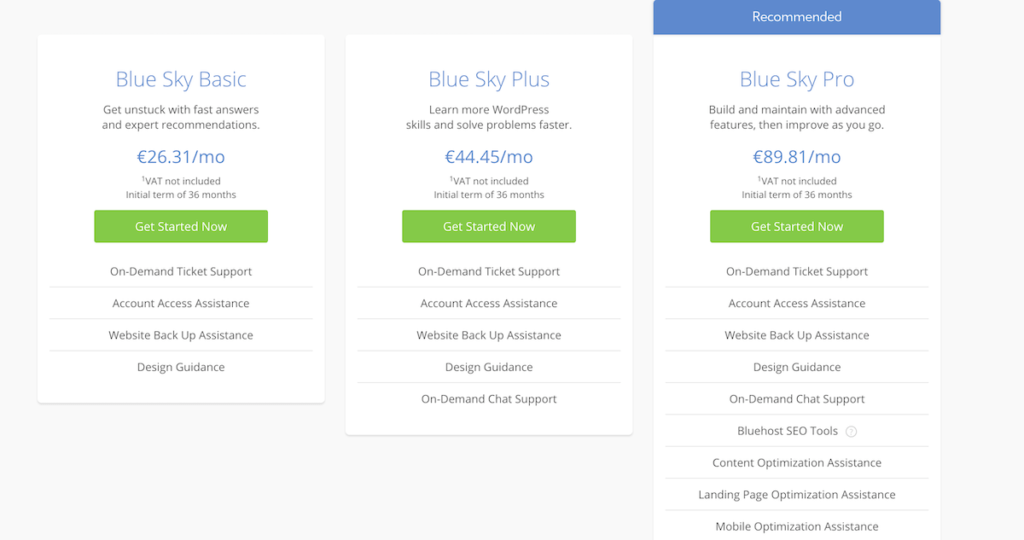
This is interconnected with the previous paragraph. The additional tools, such as their Blue Sky, cost money, and some may be useful. However, as I mentioned in other reviews, I want it to be all-inclusive whenever I make a purchase. In other words, I appreciate being satisfied with the initial purchase.
I’m not fond of adding extras (from SEO tools and extra security to Content Delivery Network). Nonetheless, I understand that this is how the world moves; therefore, it doesn’t come as a significant disappointment. However, I also need to write it down.
Another thing I should point out is that website migration is not free on Bluehost. You will have to pay for it. When I moved my Greek website, I chose to do it myself. This saved me approximately 150 $.
So, if you want to migrate an existing website but don’t know how, get prepared to spend some cash. Lastly, you can also expect some marketing via Live Chat, especially if your inquiries concern software or SEO.
Quick tips about Bluehost shared hosting packages

As you can see, the positives outweigh the negatives for me. Once again, this is my honest opinion, and I’m not someone who regularly compares web hosting services. However, I felt it might be helpful to some people to describe what it’s like to be a Bluehost client.
As I mentioned earlier, if I come up with more pros and cons, I will record them in the respective section. For now, I can highly recommend Bluehost.
Before I continue, let me summarize my Bluehost tips.
- Get the Bluehost Choice Plus bundle. It’s the best value for money. You’ll get up to 60% off by signing through this link. If you can afford the cost, Choice Plus is a no-brainer. However, the Basic option is also suitable if you are on a tight budget.
- Sign up for three years. That’s the sweet spot to maximize the price reduction. It’s also important to have an overview of how well your blog or website is performing and whether you want to continue after three years.
- Don’t get any extras. Bluehost’s shared hosting plan offers a free SSL certificate and a complimentary domain name for one year. That’s enough for you to go. I didn’t use their SEO tools (I’ve heard they’re good), and I preferred to work more with WordPress plugins. At the end of this post, I will add some extra resources. So, get what’s in the bundle and nothing more.
- The e-mail platform is decent. You can set up your email on Bluehost’s platform. I didn’t buy the Office option. Instead, I use “Roundcube,” and it’s okay. It doesn’t have the prettiest interface, though: it seems like a return to the 90s (but what’s wrong with the 90s anyway?). But it does what it’s supposed to: receive and send e-mails.
- Make the most out of customer service. If you have questions, reach out to Bluehost’s customer support. They will advise you and attempt to resolve the issue. Plus, Bluehost has a good knowledge base, so you might be prompted to dedicated articles that will solve your questions. Nonetheless, the employees at customer support are helpful. So reach out to them, and don’t be shy. Ask. That’s the only way to develop.
Other Bluehost hosting services: VPS & Dedicated hosting
As a beginner blogger or website owner, you won’t need that. Unless, of course, you are willing to spend big from day one. I’m adding these two advanced options exactly for that reason: just in case you want to build something big straight away.
Remember that everybody wants to make something big, but there’s one thing: money. If you can splurge, then, of course, you should go for one of the following options. However, if your budget is limited or you’re unsure, it’s best to stick with the shared hosting option.
Since you’re still here, I assume you’re interested in more professional hosting. Bluehost, precisely like every other hosting provider, has more advanced options. These are:
*The prices are discounted through my link.*
VPS Hosting by Bluehost
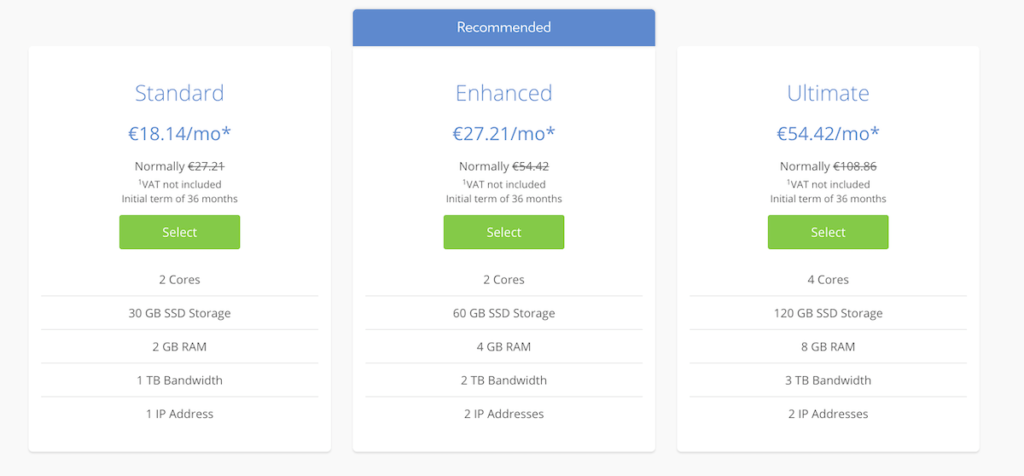
VPS hosting stands for Virtual Private Server hosting. That’s made possible by virtualizing a Dedicated server and splitting the resources among the users of that server. In plain language, that’s an upgrade of your hosting service because VPS hosting is (usually) faster and more optimized. This, of course, comes at a price, as shown above. Prices are 2-3 times more expensive.
You might wonder: What’s the difference between Shared and VPS hosting? Users on Shared Hosting depend significantly on other websites hosted on the same server. That said, your blog might not have enough RAM or CPU if it’s hosting a super large or resource-intensive website.
So, your site might appear slower. In VPS Hosting, that’s not a problem: users can configure their hosting environment.
Dedicated hosting by Bluehost
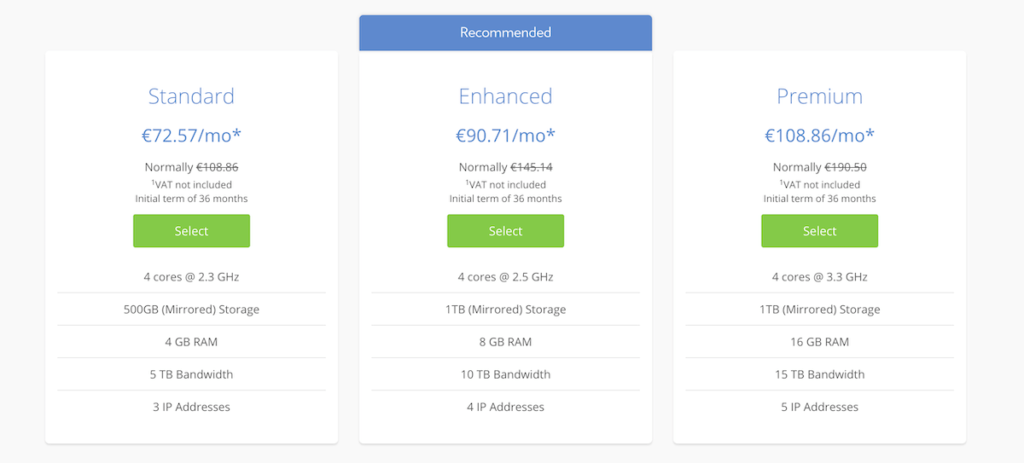
The top option for hosting a website is, of course, dedicated hosting. If you want the best security, performance, and control for your website (who doesn’t?), that’s probably the holy grail of hosting. You get your own server, your website is fast, and you don’t need to worry about other sites on the server: more RAM, more configuration options, more everything.
This solution is ideal for websites with high traffic volumes. In my opinion, if you’re just starting out, this is not for you. The pricing is on another level, and it’s expensive. Refer to the prices above for an idea.
Bluehost Review: quick Q&A
How can you pay for Bluehost hosting?
There are no major surprises here: you can pay with any major credit card or via PayPal.
Is there a money-back guarantee?
Yes, Bluehost has a 30-day money-back guarantee. However, keep in mind that you won’t get back the 15 $ for the domain name in case of cancellation. Additionally, if you purchased add-ons and extras, you won’t receive a refund for these either.
Bluehost Shared Hosting: Who Can Benefit from It?
This Bluehost review primarily focuses on individuals about to start a blog, website, or small business. That said, Bluehost shared hosting is probably the best option if you are about to create your own business. Don’t let the term business terrify you: it is a business because you are about to invest. Otherwise, you wouldn’t search for paid shared hosting options: you could just go with a free Blogger or WordPress account. Right?
I’ve been writing novels and short stories for years, but I only started blogging in August 2018. I treated this travel blog as a business from the very beginning. What I mean here is that I decided to invest back then and create a website from scratch. I chose my plan, bought a three-year plan, and started writing.
I wanted – and that’s what Bluehost gave me – to write without caring too much about technical aspects. Of course, I deal with them, and I also do SEO. Now and then, I might encounter issues, but these don’t consume my writing time. I reached customer service via live chat. When the problem is solved, I return to writing.
So, if you ask me for whom shared hosting is intended, I’d say it’s for beginners. However, it’s also for beginners with some ambitions. Bluehost shared hosting is ideal for people who want to grow a blog. If you prefer to write sporadic posts, you can opt for free hosting.
However, if you are serious about monetizing your blog, you need proper hosting. Bluehost helped me grow this blog from scratch to several thousand page views per month.
If you’re a small business looking to establish a professional website, Bluehost’s shared hosting can help you get started. If you start receiving a large amount of traffic, you’ll likely need to upgrade. But such traffic also means proper monetization; therefore, spending more won’t be a problem.
I was a beginner in August 2018, and I see how far I have traveled in the blogosphere. Therefore, I can only recommend Bluehost’s shared hosting if you are just starting out.
So, is Bluehost good? Do you recommend it?
Yes. Absolutely. Their web hosting services are totally satisfying for me. I never reached a dead end so far, and I never felt that there was no one to help me. Their knowledge base is helpful, and their Live Chat is superb. Their basic shared hosting is good, and if you go for the Choice Plus plan, you get quite a few things to get your site on the right path.
They offer an SSL certificate with every plan, which is something you shouldn’t overlook. Bluehost has been a web hosting company for almost 25 years (it started in 1996 but became Bluehost in 2003). That’s enough proof of their services.
My blogging resources
While I mainly write travel articles, I sometimes write about travel blogging. It’s part of the journey, I guess, to share my blogging experience because a) it feels like I’m doing a recap of what I learned, and b) it might be helpful for others. Giving back to the community is a meaningful act, and even if just one person finds what I write helpful, this blog has reached one of its goals.
The following articles are specifically about blogging and travel blogging.
- How to start a travel blog (or any kind of blog). That’s a lengthy guide on creating your blog in 30 minutes. I analyze the process step by step, and there are also loads of tips. Read this blogging guide here.
- Choose wisely your blog name. In this article, I explain the process of choosing your blog name wisely, offering numerous tips on how to find the best one. Read the article here.
- 12 Things I learned after six months of travel blogging. That’s my very first blog post. It always makes me smile because it’s about the first things I learned. However, I still find those things relevant. Read the 12 things here.
- What I learned after a year of travel blogging. That’s the article I wrote for the first milestone of Letters to Barbara. I celebrated it on a remote Greek island, and it’s a long article, but helpful nonetheless. Read the article here.
- How to run a blog when everything is falling apart. This is my anniversary post for the two years of blogging. However, it’s not a very optimistic one. Read here how you can run a blog when everything is falling apart.
- Blogging gear for minimalists. In this article, I present my blogging gear. Even though it’s more of travel blogging equipment, the truth is that you can run every kind of blog with it. As for the minimalists, well, this translates not only to lightweight gear but also to just a small number of devices. I’m sure that it will save you money and trouble. Check my blogging equipment here.
- 12 Travel Writing Tips. Lastly, that’s my eBook about travel writing. I share the travel writing tips that have helped me write my travelogues for over a decade. You can see more info and purchase a copy of my ebook here.
- What’s the cost of starting a blog? In a comprehensive article, I narrowed down all the possible costs associated with starting your blog.
Bookmark this Bluehost Review (or save it on Pinterest below) because I will update it whenever I write a new article about blogging.
Bluehost Review: Final Thoughts

I didn’t try to compare different hosting providers in this Bluehost review. It’s totally outside my expertise, and I’m sure many Bluehost reviews have already covered it. Instead, what I aimed to do here was to provide fellow bloggers and beginners with an overview of Bluehost’s services. I primarily focused on shared hosting, which I believe is the best option for beginners.
I’ve been using the platform for quite some time to understand what works and what doesn’t. However, I find the Bluehost pricing fair and the hosting plans suitable for all types of websites. You can find the current Bluehost offers here.
Since this is not a comparison, I will not provide an overall rating. I think it’s rather pointless. What matters most is the user’s experience. It’s a hard time to invest in creating a business, let alone running an online one. However, Bluehost proved to be a valuable companion on this journey, and I’m glad I chose them.
Is there a better web hosting service available? Maybe. However, I know that Bluehost allowed me to focus on content, rather than technical issues. For someone who wants to write, that’s already more than enough.
See more blogging articles here.
Pin it for later

Sharing is caring: Please share this Bluehost Review with your friends on Social Media.
Thank you for the detailed review, George. I’ve been searching for a platform to host my blog for a couple of weeks and after reading your Bluehost review I decided to sign up with them. So far, I’m very happy with what they offer and indeed the interface is easy to navigate & create. I’ll make sure to comment back after the blog is up and running.
Take care, Micha.
Hey Micha, thanks for stopping by. Glad that my review convinced you to sign up with Bluehost. As I wrote in the post, I’m very happy with their services. My first-hand experience with them is really good. Make sure to use the Bluehost live chat if you have any questions -they solved everything for me so far. Take care and enjoy blogging!
George
Hey George,
The extras of Bluehost seem alluring to me.. Do you think they are true value for money?
If they’re, I will go for Bluehost. If not, I would like to prefer SiteGround..
I have read here that SiteGround has fewer renewal charges – https://www.ecommerceasean.com/flywheel-vs-siteground-for-wordpress-review/
In addition, SiteGround offers a lot of alluring features without charging a single extra dime..
If I am wrong, correct me. I want to pick the best web hosting for my catering business..
Hey Nina,
I’m still very satisfied with Bluehost. I haven’t used Siteground, therefore I cannot really tell you if their features are better than the Bluehost ones. From what I read, though, it seems a very good provider as well. The reason I recommend Bluehost is mainly because I use it for a couple of years, and I had the opportunity to use their features extensively. To be honest, I would care less for extra features and pay attention to the up times of each provider. For more than two years, my website was never down (not for a single second), and that’s something I appreciate a lot. In terms of pricing, I think that both providers are offering quite similar packages. Since you are about to start a business, I would recommend not buying the cheapest one. As I write in the review, the Choice Plus is an excellent option -and I believe that Siteground will have a similar bundle as well.
Long story short, yes, I can highly recommend Bluehost, and I truly find its features to be excellent value for money. Plus, whatever issue I run into, it was solved straight ahead via Bluehost’s customer service. Once again, it doesn’t mean that Siteground is worse; but after using for two years Bluehost, I prefer to go with (and recommend) the service that proved to be fine for me.
Do let me know if you have any more questions and also which specific features you need. I run a small travel shop in the blog and I use Woocommerce. Despite being a bit complicated to set it up, it works smoothly.
Take care,
George
Bluehost has been an horrible company to be attached to for the past 10 years. There was never a time I was happy with their service. You get stuck with these hosting companies due to the challenge of switching providers. I finally made the effort to backup all my sites and databases and finally escape their inept clutches.
God what a pain it has been trying to deal with this company. They are not proactive at all. Their support is very unskilled. They pull every trick in the book to prevent you from leaving. There are so many competitors with much better services that have been created over the years. Im happy to be with a capable company now in hostinger. They do everything right. I very strongly suggest not going with bluehost. You will regret it!
Hello Adam,
I’m sorry to hear about your experience with Bluehost. From my side, I still consider myself a happy client. I never had issues with Bluehost and downtimes were also very rare -like once or twice for my websites through the years. Whenever I needed help I got good support from their chat.
Thanks anyway very much for commenting and I’m glad that you found a good alternative that works well for you.
Best regards,
George