

You’ll find a comprehensive guide here if you want to know how to start a travel blog (or any professional blog in general). After reading this article, you can set up a travel blog on WordPress within 30 minutes. Of course, you must remember that maintaining a travel blog means dedication, scheduling your blogging workflow, promoting your posts on social media, etc. But for the time being, everything you need to know for your first steps is here.
Besides that, I plan to enhance this post’s content whenever I come up with new ideas or current trends; therefore, make sure to check it out once in a while. Also, if you are interested in additional info about my budget, gear, etc., please check my FAQ page. Last but not least, if you have any questions about blogging, please leave me a comment at the end of this post. I’ll do my best to reply and give you some extra tips and advice.
So, let’s begin with the guide on How to start a travel blog.
How to start a travel blog (or any kind of blog)
The moment you decide to start a travel blog is the moment you embark on a new adventure. From now on, your travel blog will be as important as your passport: it’ll help you travel to new places and see them from a different perspective. In this guide to travel blogging, you’ll find everything you need to know to start your travel blog, plus tips on monetizing it.
Let’s start.

Before even signing up for web hosting, you should consider the name of your travel blog. I advise writing a couple of ideas (10 or even 20, but not 1,000) on paper and then reflecting upon them. After that, you should go through a short evaluation period, and you should be clear with yourself: what would you like to achieve with this blog? Are you feeling comfortable under the name of your travel blog? Do you think you can enhance its content without losing track, i.e., without the name being incompatible after a while?
As a rule of thumb, you should avoid names with numbers and hyphens because this will make the website less easy to explain and hard to remember. Instead, you should try to find a memorable name and check if the domain is available when you do. In general, available domains are usually cheap; they cost approximately 10-15 euros per year. Of course, if your ideal domain is taken, you can always try to buy it, but I don’t recommend it: this can cost a lot.
Try also to avoid overused or entirely cliche words. “Nomadic” or “Adventurous” are beautiful words, but they are so overused that you might end up being just another nomadic/adventurous guy. People will usually stick with the ones they already know; therefore, try to be creative.
Last but not least, think about the future. It’s fine to have a Wonderful[City Name].com website if you don’t plan to leave this city, but what happens if you change your mind? The name will look funny. Therefore, keep an eye on the future when picking your name.
Update: I wrote a separate blog post with tips and techniques to help you choose your blog name. Check it out here.
A personal tip before you start a travel blog
If you have a clear concept in your mind (like I had with the Letters to Barbara), try to keep the name as short as possible. Avoid removing words because it might ruin the whole concept. For example, if I were about to cut the word “to” from this website, I would have ended up with LettersBarbara. This would have sounded more like I was expecting letters from Barbara instead of writing letters to her.
So, while having a short name (many people might say: the shortest name possible) is essential, I would suggest not killing the entire concept by minimizing the URL to save 2-3 letters. If it serves your concept well, then keep it. On the other hand, you can probably imagine why, for example, TheLongLettersToMyVeryBelovedBarbara.com wouldn’t work well.
2. How to start a travel blog: Get Web Hosting for your blog
That’s one of the most critical aspects of How to create a travel blog. What is hosting? It is actually where all your website’s data will be stored. Therefore, you should wisely pick up the web hosting provider because you definitely need your site up and running non-stop. Otherwise, you might lose traffic, rankings, and, of course, money.
I always suggest Bluehost because I am delighted with their services; the Letters to Barbara never went offline, and the customer support is excellent. In addition, Bluehost offers, in my opinion, the best shared hosting services. For the time being, you don’t need to consider a dedicated server (it costs several hundred euros/dollars per month).
If you decide on Bluehost, follow this link and save up to 60%.
*Update: I wrote a very long and honest review about Bluehost and its hosting plans. You can read my honest Bluehost review here.
So, here is what the Bluehost page will look like when you follow the link.
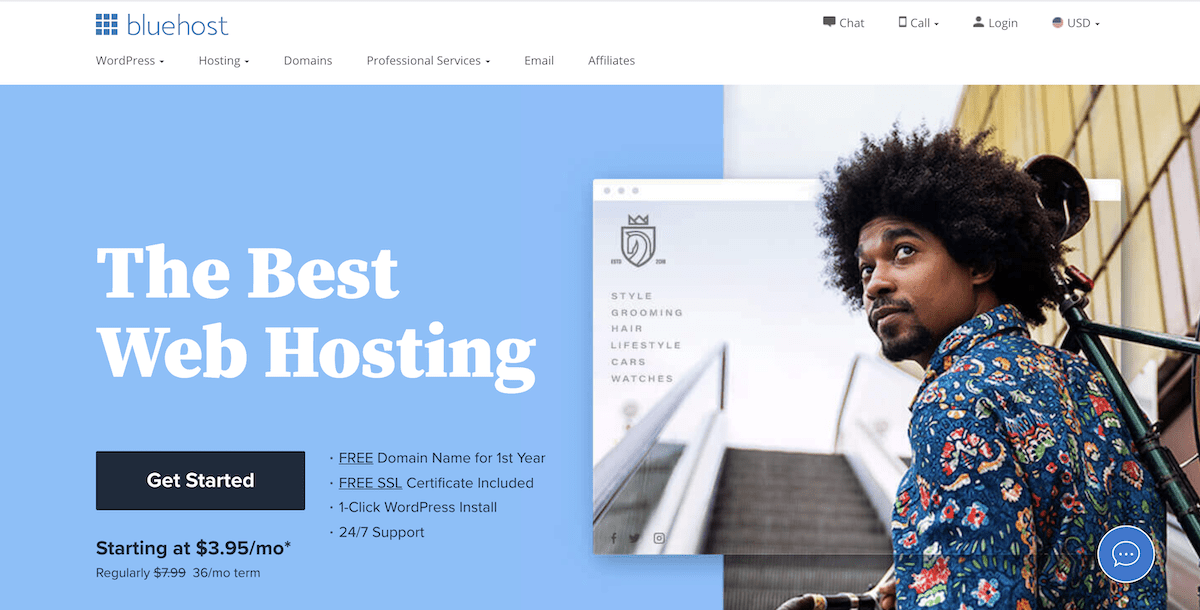
Afterward, you should click on the dedicated button (Get started). It will bring you to the next page. You can see the pricing, including the current offers I promised you. It should look like this
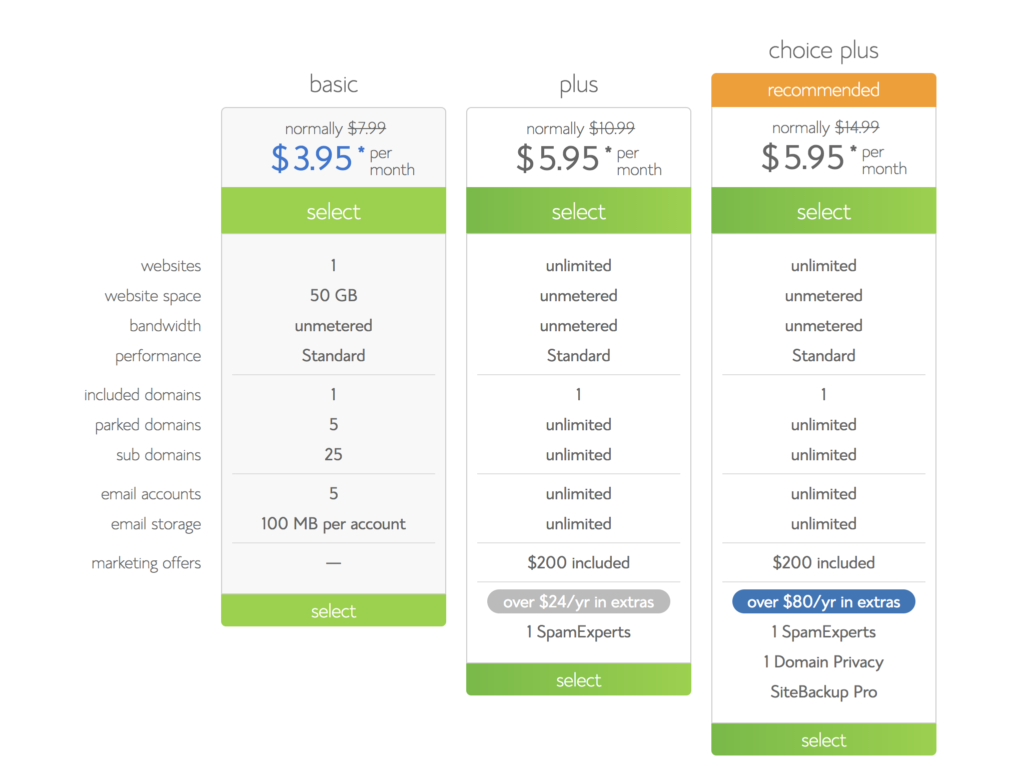
As you can see, you have three different options. For the Letters to Barbara, I decided on the Choice Plus program. This was because a) it had the same price as the Plus option, and b) the Domain Privacy was included. The Domain Privacy merely means that if somebody searches the WhoIs directory, they will not see your address and all your personal details. Instead of that, they will see the Bluehost address details. So, between the “Plus” and the “Choice Plus” bundles, the Choice Plus is, for me, a no-brainer.
However, if you are on a tight budget or are still unsure that you will stick with travel blogging, you should go for the “Basic” plan. Just keep in mind that if you need the Domain Privacy option, you will have to pay some money to buy it.
After selecting your bundle, you will be prompted to check if your desired domain name is available. Remember that the domain name is included in the price. It should look like this:
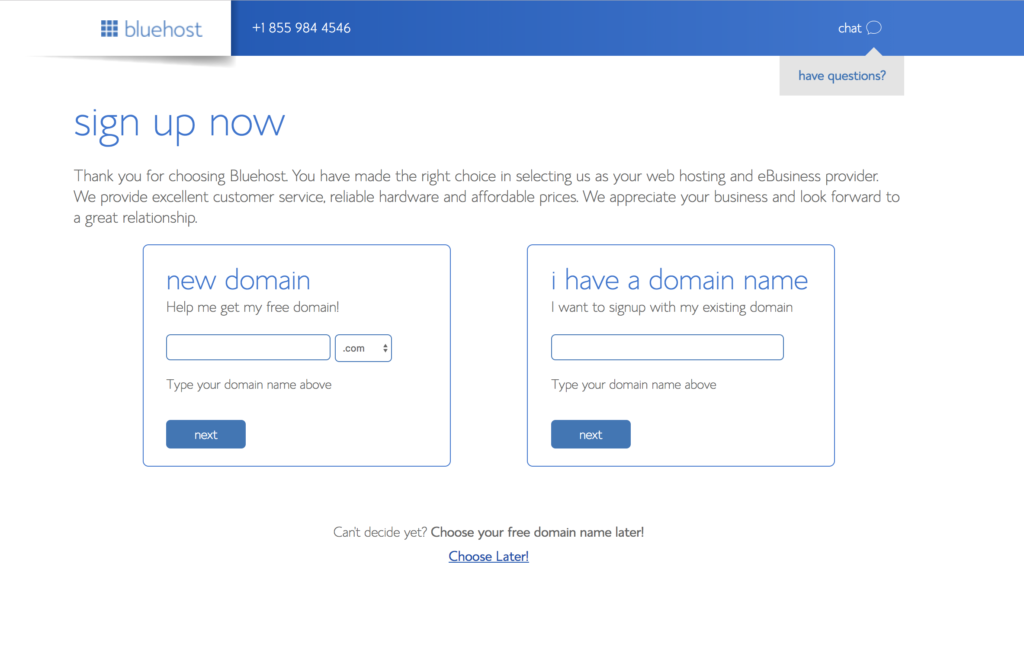
After securing that your domain name is available, you hit “Next.” You will be directed to the payment page. You will be asked about your personal information; you will be shown your package details, and also, you will be asked for your credit card details.
An extra blogging tip
To make the most of the offers, I do recommend buying the 36 months option. This seems to be the sweet spot of saving. For example, in the basic plan, the 12-month-plan currently costs $5.95/month, and the 24-months-plan costs $4.95/month. The big discount of $3.95/month comes with the 36-months-plan. Their 60-months-plan comes with no further discount and still costs $3.95/month.
*Billing is now available in the following currencies: EUR, GBP, CAD, and AUD.*
More or less, you will see this:
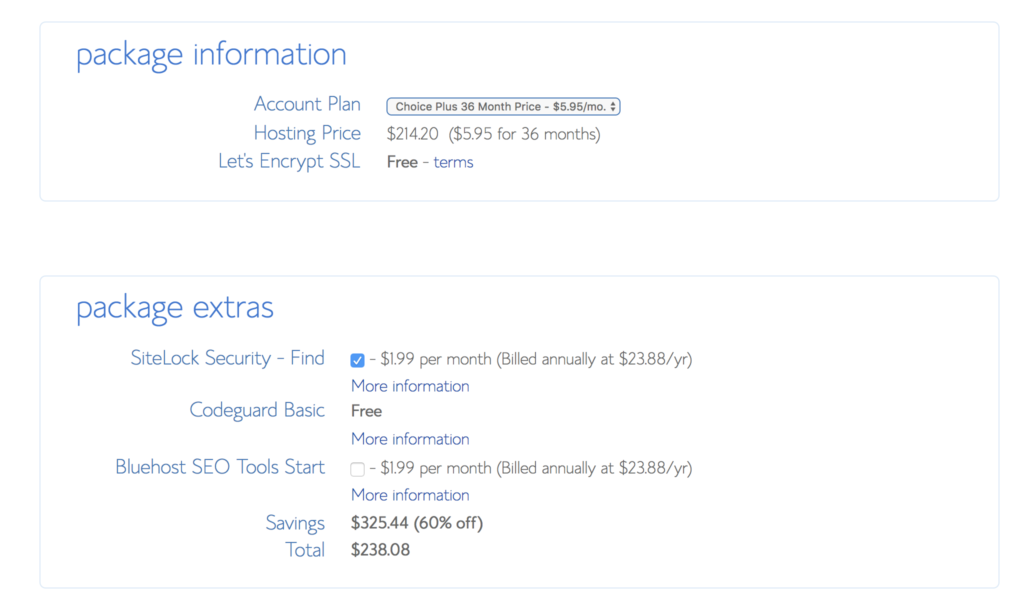
Bluehost also offers some package extras. I didn’t buy the Bluehost SEO Tools Start (I will talk later about a useful free plugin), but I did buy the Sitelock Security. This increases spam and malware monitoring. If you think you don’t need it, uncheck the box. As you can see, there is 60% off the final price by following the link.

Add your payment details straight ahead. Congrats, you are now the happy owner of a website!
Other web hosting providers for travel bloggers
There are lots of web hosting providers out there offering excellent services at competitive prices. Among the most famous and reliable ones are Siteground and Weebly. These were actually the other two providers I considered when I started running this travel blog. In the end, I decided on Bluehost, but both of these are legitimate services, and they receive praise from their users. If you’d like to see the current web hosting offers by Siteground and Weebly, just click on the images below.

3. Install WordPress (that’s when you really start your travel blog)
So, we’re now entering phase two of How to start a travel blog.
You now have total control over your website on how it looks, and you can, of course, monetize it. Bluehost offers a one-click install of WordPress, the biggest and most reliable blogging platform. You will be asked for a password for your account, and then you will pick up a theme.
Don’t waste too much time on that: you can change the theme anytime. Just follow the quick instructions and make sure to choose “Business” and not “Personal” when you are asked what kind of website that is. I suggest “Business” because I assume you want to monetize it. If not, then go with the personal option.
A personal tip if you haven’t used WordPress before
If you don’t have any idea about blogging on WordPress, I have found two handy websites. They cover everything, from your first-step questions to more advanced topics. They both helped me a lot, and they still do sometimes.
Spend some time familiarising yourself with WordPress and finding all the answers you might need on the abovementioned websites.

4. Find a professional theme for your travel blog
Now, if you are serious about blogging, you must have a professional theme. They usually cost anything between 20 and 70 euros. Professional themes will give a more elegant and serious appearance to your website. I bought mine from ThemeForest, and I highly recommend the platform. They have tons of themes for every style.
Of course, you can also go to your WordPress Sidebar on your left, hover over “Appearance,” and choose “Premium Themes.” There you can find loads of WordPress themes, too. However, I found the themes on ThemeForest beautiful, so I can only suggest them. It’s really up to you. As I mentioned above, several platforms offer professional themes, but since I haven’t used any of them, I prefer not to write something invalid and not based on my experience.
A personal blogging tip
Whenever I searched for professional themes, I kept an eye on two critical factors. The first one is that the theme is Responsive. This means that the theme will be customized automatically for smartphones or tablets. Most people nowadays use mobile devices, and the last thing you want is a messy website when a visitor uses their smartphone.
The second factor I paid a lot of attention to was the Maturity of the theme. I prefer to stick with older themes, at least a year old. Also, I always checked when the last update of the theme took place. An up-to-date theme translates to a bug-free theme.
On the other hand, newer themes tend to look very modern, but they are often full of bugs. Also, a serious chain of updates shows that the developer still pays attention to the theme. Therefore, older themes that are constantly being updated are usually the best options. Subsequently, a smoothly running theme means you can create your website more easily without technical distractions.
In conclusion, I would check if the theme existed for more than a year and if the last update was performed within 3-4 months. If that’s the case, I will go for it.
*Bonus blogging tip: How to find the best font for your blog
The obvious answer here is trial and error. Finding the best font for your blog is actually one of the most important parts of starting a blog. You might spend a lot of time searching for the most catchy font. Unfortunately, there’s no magic rule to figure this out, but here’s what you can do.
a. The easy option
The easy option is to start experimenting with the fonts you’ll find within your theme. Write a short paragraph and try different fonts until you find the one you like. Make sure the font is easy to read, and depending on the WordPress theme you choose, adjust the size. Don’t go for anything smaller than 12, and try not to go beyond 15-16. The sweet spot when it comes to optimal font size for blogs is usually between 12 and 14. But feel free to try different fonts and adjust the size, respectively.
b. The pro option
This is a pro tip. I bet you have read many blogs already and might have some favorite ones. Did you find a font you loved in a blog/website but didn’t know which one it was? Well, you can use some tools to determine which fonts your favorite blogs use. Here’s how to do it.
- Visit the blog where you found the fonts you loved.
- Take a screenshot of a post/page where the fonts are visible. To take a screenshot on a Windows computer, hit Alt+PrtScn; for Mac users, hit Shift+Command+3.
- Open the screenshot. Crop a couple of words (2-4 are enough) and save it.
- Head over to WhatTheFont.
- Drag and drop the image with the 2-4 words you just saved. Hit upload and continue.
- You will now see a marked word or two on the screen. Make sure that you are happy with what the software marked. If not, adjust it; if yes, hit continue to identify the selected font.
- You will now see the font that the website you chose is using. You will (most likely) see several options. These are actually different variations of the font. Next to the font name, you’ll see where you can get this font (free or paid) for your blog. Expect to see paid options as well.
Choosing the right font for your blog is crucial. If you are happy with the free fonts, it’s fine. But if you think you’d love that paid font because it will make your website look better, consider buying it. Finding the best font for your blog is important because that’s how your readers will decide if they enjoy reading your blog or not. Remember: it’s all about user experience.
5. Download some WordPress plugins (but not too many!)

The beauty of WordPress is that it comes with an enormous amount of plugins. So on the left sidebar of your dashboard, you will see a section called Plugins. Hover over, and you’ll find both the pre-installed plugins as well as the “Add new” option.
In the beginning, you will probably think that you need every single one of them. This is highly tempting, of course, but keep in mind that your website will become very slow if you overdo it. Therefore, you should stick with the essentials, i.e., the plugins that will offer something significant to your website. Below you will see a list of the plugins I currently use.
Of course, if you think you need more plugins, you should simply install them. The installation process is straightforward, you just hit the “Install” button, and pretty much that’s it. After you are done, hover over Plugins and check what you’ve added.
- Yoast SEO. This is one of the best plugins out there, and that is why I didn’t buy the Bluehost SEO tool (check above). It will help you optimize your website for Search Engine Optimization. Every time you write a post, it will advise you about keywords, readability, about pretty much everything you need to boost your content in search engines. There is a premium version with even more capabilities for 79$. Start with the free version; it should be enough for the first months or even years.
- Akismet. Another recommended plugin. It protects you from spam comments and automatically blocks them using a particular algorithm. (**Update. I have disabled Akismet on my website. While the plugin has indeed blocked spam comments, I have received many e-mails and DMs on my Social Media from people saying they couldn’t leave a comment. So what made me disable it? Well, I couldn’t access the blocked comments and see for myself if there were also genuine ones among them. It’s true; Akismet is probably the best anti-spam out there. However, keep in mind you won’t have access to the blocked comments; if a comment is marked as spam, it’s gone.)
- WPTouch. If you have a responsive theme, you don’t need it. But if you don’t have a responsive theme, this will optimize your content for mobile devices. I don’t use it because my theme is responsive.
- Easy Social Share Buttons. It does what it says: integrates social media buttons on your website for easy social media sharing. I don’t know if it’s the best out there, but it works fine for me. I got the pro version for 20$, which includes tons of social media plus analytics.
- UpdraftPlus. It has a free version that works fine. It will back up your website so you won’t lose anything if something goes wrong. By using that backup, you can also restore a previous version of your website.
- W3 Total Cache. This is a performance plugin. It will improve the speed and overall experience of your website. Advanced users can configure it any way they want, but the tool is helpful for beginners.
- WordFence Security. The WordFence has a good free version and an advanced Premium one. It protects your website from malware and viruses — an excellent Firewall option.
- Get Grammarly. This is not a WordPress plugin but one for your browser. Grammarly is something that every writer would love: it automatically corrects your texts and suggests changes to your posts. It has a free version, which I used from day one, and a pro version. I recently bought the pro version and wished I had it from the beginning. It’s advantageous, especially if English is not your mother language. Learn more about Grammarly here.
- Consider iThemes. If you want to be serious about your blog from day one, consider iThemes, a platform offering premium plugins. Of course, their plugins come at a price, but they will help you run your blog smoothly. Find out more about iThemes here.
A personal blogging tip
The free versions of the plugins work pretty well for a beginner. At a later stage, you might consider buying a premium version. I still use the free versions (unless otherwise stated), and I’m delighted with them. That said if you are just starting to blog, stick to the free versions. Later on, depending on your travel blogging needs, consider some premium versions.
6. Start writing, start blogging

If you’ve followed all the above steps, it means that you are done with the technical part of creating your website. Right now, you have a platform ready to accommodate your content. And that’s exactly what you should do: write.
Write your About section
If you are an introvert, write like one. If you are the most social person, prove it. Don’t try to hide. Instead, show who you are and what you are willing to achieve with your travel blog. Avoid writing a CV; the readers need a reason to follow you, they are not here to admire your previous achievements.
Publish your first post and start blogging
Now it gets serious and, above all, fun! Apart from being your first post, it will also help you arrange the photos, check the headers, insert links, use the Yoast SEO tool, etc. Don’t think about your first post for ages; it can be anything. About yourself, your brand new travel blog, your travel plans, or even not having current travel plans.
Do proper Keyword Search (consider KeySearch)
You can write whatever you want on your blog. But, if you want to rank on Google, you must optimize your texts for SEO. Search Engine Optimization (SEO) means ensuring that your articles are optimized for search engines. In other words, your texts won’t be found online if you don’t structure them appropriately. In addition, your articles will need to have matching keywords for your topics. SEO is probably the holy grail of blog writing, and it’ll take time to be a pro.
However, there are various software packages to help you out. The most affordable one for bloggers is KeySearch. KeySearch is a tool that will give you keyword suggestions depending on your topic. Moreover, it will show you the monthly volume of searches for every topic and more advanced things like CPC.
In my opinion, this is a must software (read my KeySearch review here). It will make your road to success so much easier. I reached out to the guys of KeySearch, and I got a special price for the readers of Letters to Barbara. Just follow this link to their website and add on check out LTB20 to receive your 20% reduction on any annual plan.
Set up your social media accounts (if you haven’t already)
I know you have doubts about social media. However, this is one of the best ways to promote your content for free. Set a posting schedule and start sharing your stuff. Try to keep your social media handles the same as your website. On the other hand, do not sign up for every available social media channel if you don’t have time to deal with it properly. In my opinion, it’s better to have 1-2 social media accounts that you spend adequate time to build your fanbase instead of being on 20 social media channels and having them in sleep mode.
Focus on the ones that make you feel more comfortable. Also, the ones that bring traffic to your website (that’s the objective!) and/or bring job opportunities. For example, I never really enjoyed Twitter, but I liked spending time on Instagram.
Last but not least, have a posting plan. You don’t have to write two posts every day. On the other hand, uploading new stuff every second month will never grow your website. Three times a week, two times, even once per week is fine. What matters the most is the quality of the content, not the quantity. A well-written post means the reader will spend more time on your website, follow you on social media, and return. So stay focused and keep on creating excellent content. It always pays back.
FREE Travel Writing Course
Did you know that I have written a FREE Travel Writing Course? It consists of 5 e-mails in 10 days that will help you improve your travel writing rapidly. You can subscribe to it here. I promise that it will help and give you several tips, too. There is no complete guide on how to start a travel blog without a travel writing course. And mine is free, too 🙂
Learn what to do before and after publishing a blog post
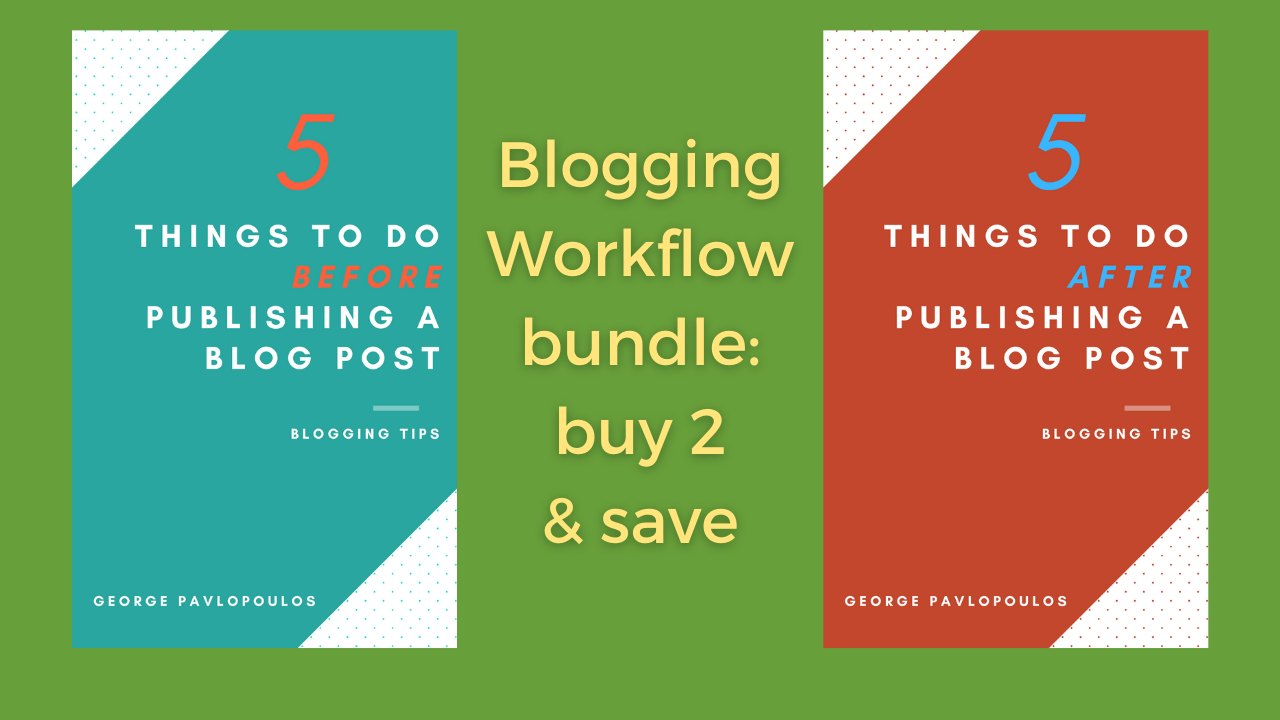
As I wrote at the very beginning, maintaining a travel blog means having a blogging workflow. That said, if you want to start a travel blog and keep running it smoothly, you also want to maximize the value of your blog posts. What does this mean? Well, apart from optimizing your blog posts for the search engines, you should also keep a couple of other things in mind.
I wrote two short ebooks for beginner bloggers where I deal with the before and after publishing a blog post. I analyze my blogging workflow in these ebooks and share the essential things a blogger needs to do. The first ebook deals with the things you should do before publishing the blog post; the second deals with what you should do after publishing the post to better control your post’s future.
You can see the ebooks here and here. You can also buy the two ebooks as a bundle here and save 12%.
A personal blogging tip
It’s always tempting to spend money on social media promotion. You dream of lots of new followers and traffic. The reality, however, is much different. Do not overdo it with social media advertising. Keep your ad budget low, especially in the beginning. Never forget that you are here to create content. This means that if your budget is not unlimited, you need this money for travel, equipment, website maintenance, food, etc.
For example, let’s say that you have a travel budget of 5,000 euros this year. Spending 100 euros per month on social media promotion means you have 1,200 euros less for traveling this year. For my traveling style, this means 2 to 3 journeys less. So be wise about spending -it might not even deserve it. And by the way: if you start spending on ads, there’s no way back.
7. Monetize your travel blog

If you are willing to monetize your blog, there are a few standard ways to achieve it. Remember that after you start a travel blog, it’s essential to understand how to monetize it. Running a blog is hard work, and you should be able to make some money at some point. There are different ways to achieve that, but you should be patient because the road is steep. However, if you create content and optimize your SEO articles, sooner or later, you’ll start earning money from your blog.
So, here’s how you can make money as a blogger.
Ads
An excellent place to start is Google Adsense. You can create an account and add snippets of code to your posts. Google Adsense will try to show ads relevant to your website. You will receive a small amount of money per click. In the very beginning, your income will be a few pennies. Do not get disappointed: monetizing is a long-term process. In general, you’ll need a significant amount of traffic to start making money from ads.
Therefore, if your goal is to monetize your goal exclusively from ads, you should focus on bringing as much traffic as possible to your travel blog. There’s no magic number; however, anything beyond 100,000 visits per month guarantees a good income.
Affiliate marketing
Whenever you add a link to a favorite product of yours (book, camera, music, etc.), you can place a direct link to Amazon, for example. If somebody clicks the link and buys that product through your website (or any product within a set number of hours or days), you will get a small commission. Amazon Associates is an excellent place to start. The same goes for hotel recommendations (linking to websites like Booking.com) or air tickets. Or, even better, join a website like ShareASale, where you can find merchants that need your blog’s advertisement space.
Once again, don’t expect miracles. Building an income through affiliate marketing will take time. Your authentic blog voice will convince your readers to trust you -and then they’ll follow your advice. Nonetheless, affiliate marketing is an excellent way to create passive income.
When your niche is competitive, monetizing your blog through affiliate links might be more challenging. On the other hand, if you find a less competitive niche, it will be easier to earn money from blogging.
Sell banner space on your travel blog
This is not easy, but you can always try to sell some banner space on your website. Then, when you reach decent traffic levels, you can contact companies (or even better: be contacted) and set a price for advertising a company constantly on your website. Companies will usually provide the banners, but there’s nothing wrong with creating them yourself, especially if you have a thing for graphic design.
The money you earn from selling space on your travel blog depends mainly on your monthly traffic. However, the sky is the limit if you have a dedicated audience and your niche is competitive.
Other ways of monetizing your blog
This can be a variety of things: from being a brand ambassador to running a social media campaign. Or write about a publication/newspaper/magazine that would like to pay you for an article. The list is endless here, and you will hopefully discover everything as time passes.
Lastly, you can create and sell your own products: ebooks, Lightroom Presets, etc. Check my travel shop for a few ideas.
A personal blogging tip
Do not use affiliate links of services or products you haven’t used. It’s lame. Yup, it is. Your readers are here to get first-hand recommendations; if you cheat on them, they will simply walk away. Hard but also fair. That said, I never promote any affiliate websites if I am not a long-time user. I have been shopping online from Amazon since 2010 and booked hotels from Booking.com for almost a decade. Websites like Agoda might be fantastic and all, but the truth is I never used them. How could I drive my readers there? By now, you know what it is: It’s lame.

How to start a travel blog & how to monetize it: steps recap
So, here’s what you need to create a travel blog:
- Find your blog name.
- Buy web hosting
- Install WordPress
- Find a professional theme
- Download some plugins
- Write your first blog post
- Write, write, write.
And here’s how you can monetize your blog:
- Ads
- Affiliate Marketing
- Sell banner space on your blog
- Create your own products
- Be a brand ambassador
- Write sponsored posts
How to start a travel blog: Final thoughts, resources & info
If you have made it all the way down here, it means that you are either interested to know how to start a travel blog or that you have already created one, and you are ready to write your first post. Owning and running a travel blog might be the most beautiful journey you’ll ever have. There will be many ups and downs, but it is worth it if you enjoy writing and traveling.
Make sure to check this page every once in a while: I update this article monthly and add new content, depending on current trends or new ideas. Also, if you’d like to know what’s it like being a travel blogger, there’s some extra material about my journey through the blogosphere:
- Six months of travel blogging. That’s one of the first posts I have ever written about travel blogging. The 12 things I learned after six months of travel blogging will inspire you and inform you on what to expect after half a year into blogging.
- One year of travel blogging. For the first anniversary of the Letters To Barbara, I wrote a comprehensive post about my experience after one year of travel blogging.
- Two years of travel blogging. I celebrated the second anniversary of the Letters To Barbara in 2020. You know what this means, right? Running a travel blog during the pandemic was -the least to say- challenging. So, here are some things I learned about blogging the hard way.
- Three years of travel blogging. On the third anniversary of my travel blog, I tried to explain why this was the first real milestone. Even though you are already a travel blogger from the day you start typing your first words, maintaining it for a long time is demanding. So in this article, I wanted to clarify what it means to manage the ups and downs of blogging. You can read about my first blogging milestone here.
Other blogging resources
You can access all my blogging-related articles here.
Among the most important posts of this travel blog is the article about the travel blogging gear you’ll need. The post is intended for minimalists (i.e., people traveling light), but I’m sure it applies to everyone. You can see my blogging gear equipment here.
Also, I have you covered if you’d like to see an honest article about how much it really costs to start a blog. I wrote a separate article where I break down every expense you need. The article covers a wide range: from people on a tight budget to people that want to go all in. You can read the article here about the cost of starting a blog.
Epilogue
Many people keep e-mailing me and asking me how to start a travel blog or if running a travel blog is still a thing. Well, blogging is here to stay for sure. And if you follow this step-by-step guide, you’ll be able to create your blog quickly. Then, all you have to do is start writing (read here how to become a writer).
If you have any questions, do not hesitate to leave a comment below if you’re just about to start a travel blog and need help. I’d be glad to offer you some tips. Good luck!
Last updated: August 2022
Selected guides: Greek islands on a budget, The best travel camera & The Ultimate Berlinale Guide
Pin it for later
Please share, tweet, and pin if you enjoyed reading How to start a travel blog and monetize it.
12 responses to “How to start a travel blog (& how to monetize it)”
George, this is an excellent piece of advice. I’ve been searching for a tutorial for quite some time on how to start a blog, and everything looked pretty much the same. I’m just about to start my own blog, and I wanted to ask you: how do you handle spam comments? Is it something to worry about?
Also, do you have any tips for finding a blog name? I’ve been struggling with that lately.Hey Alice,
Thanks for the kind words -glad you found the guide helpful. Regarding spam comments, as you read on the guide, I used to run Akismet but not anymore. The reason is that I was losing several genuine comments. Therefore, I preferred to disable it and deal with the spam comments manually. Practically, I’d go through the comments once per day and approve only the ones that look legit. I do receive quite a few of them per day but nothing that I can’t handle. For the first couple of months, you won’t face any insane amounts; there might be a couple and just for a short timeframe. As your blog will grow bigger and bigger, you might have to spend more time dealing with them. But as long as it’s nothing really alarming (like a thousand daily), don’t worry. I guess you should focus on creating content initially, and not worry so much about automated comments from bots.
Regarding the tips on choosing a blog name, I have also written a new article about the topic. You can find it here.
Enjoy blogging!
George
Hey George. That’s probably the best guide I found online on how I could start my own blog. I’m not in the travel blogging niche but your article has so many helpful takeaway points. Loved your straightforward writing about the WordPress plugins. If you don’t mind, I’d like to ask you a couple of questions.
Do you think that somebody could make money via affiliate marketing or is it impossible nowadays? I mean, do I stand a chance as a beginner blogger to earn a side income from it?
I also see that you recommend Bluehost. Do you think it’s the best hosting choice out there?
Thanks a lot -I’m already part of your mailing list and I love your letters. Take care.Hello, Josh. Thanks for stopping by. First of all, I’d like to wish you the best of luck on your journey in the blogosphere. Now, to your questions:
a) Yes, you can make money through affiliate marketing. In the beginning, you should expect just some pennies/dollars. It takes time to build trust with your readers, and it won’t also be that easy to have enough traffic. It certainly doesn’t mean that everybody who visits your site will click the links and purchase something. Moreover, you will have to work on your posts thoroughly. All that said, making money through affiliate marketing will take some time. I made a decent income from affiliates after approximately 14-15 months. Therefore, if you focus on products, services, etc., and people trust you, then yes, you’ll start making some money. How much? Well, it depends on both the traffic, the niche, and the products/services. The commissions are not that high, so you’ll need some traffic for sure.
b) Yes, I recommend Bluehost. For the things a beginner blogger needs, I find it great. I never had problems with Bluehost so far; therefore, my experience is positive. Everything works fine, their Live Chat solved all my questions, and my website was never down. I can’t tell you if Bluehost is the best of the best, simply because I didn’t try everything out. I only have experience with two other platforms; both of them worked well. However, from Bluehost, I’m even more satisfied. I can assure you that for my blogging needs seems optimal.
Hope I helped a bit. 🙂
George
Hey George,
I came upon this post in an attempt to check if I was doing something wrong with my blogging or not and the only 1 thing that I feel that I did differently was choosing a free theme. Is it really important to invest in a paid theme at the start? I am 6 months into travel blogging and have not had great success yet even in terms of pageviews. Can the theme be a reason for that?
Thanks in advance!
PoojaHello dear Pooja,
No, I don’t think that a free theme is bad just because it’s free. What is more important is a) if the theme is frequently updated and b) if the theme slows down your website. As long as none of this is happening, then your theme is good to go. When it’s done right, a professional theme definitely has some advantages: faster loading times, better aesthetics, and receives more frequent updates. I visited your website, and nothing seems wrong in terms of speed from my edge.
Regarding the pageviews, well, 6 months is not a very long time to see results. I started seeing some more serious traffic after 8-9 months. I used to blog frequently (and I still do), usually 1-2 times per week. It also depends on how competitive the keywords you are targeting are (for that, you might need an SEO tool like KeySearch that I mentioned above). In parallel with writing, it is also important to raise your blog’s authority. Getting featured in other blogs/publications or a bit of guest blogging will definitely help you.
Everything is trial and error in blogging. See what works and repeat it, see what doesn’t, and try to change it. At the end of the day, blogging should be fun. Don’t lose heart, and give it minimum 12-18 months before you see some traffic. If by then you don’t see any results, you probably have to rethink your strategy.
I hope I helped a bit.
George
Hello George. I’m quite undecided regarding what’s actually the best way to bring traffic to my website. I’m still in the process of setting up my blog but I don’t know where to focus in order to start growing it. I know it might seem too early, but I’d like to invest time and money from day one. Should I focus on search engine traffic or social media?
Thanks for a great blogging guide, I used all the info that you shared here and took advantage of some of your offers. 🙂
Hey Lauren,
Thank you for your kind words. Well, I can tell you what I’d do if I were to start a blog today: I would focus 90% on search engine traffic and 10% on Social Media. The main reason is that I keep seeing a rise in my organic traffic; on the other hand, the algorithm updates of Social Media recently killed everything. Moreover, I prefer to keep the original content I create on my website (because I own it) and not on Social Media (because I don’t really own anything). I would only consider focusing more on Social Media if I had a proper budget to spend on ads. But I don’t have an endless budget and -honestly- I prefer to spend my money on more useful things.
All that said, if I were you, I’d make sure to launch my new blog with a minimum of 10 articles. I’d focus on organic traffic –check here my KeySearch review to see how I rank for keywords– and I’d use social media mainly for brand awareness.
Best regards, and enjoy blogging!
George
hey george, this was a great blog even i was thinking of starting my own personal blog too but was little bit confused how to do that step by step but your blog was quite easy to understand. hope you will see my blog soon. Thanks
Hey Amit,
Thanks for your kind words. I’m glad the article helped you to start your travel blog. I just visited it and looks really nice. Wishing you all the best and lots of success!
George
Hi, George –
I just discovered your blog and was intrigued with your detailed advice about blogging. I have been blogging using Bluehost for almost 3 years whilst working my full time job but would love to do it full time one day. For now it fulfills my passion for writing and I’m more interested in leaning to blog well than making money (for now😊). I did have a question about Yoast SEO. I downloaded it per tour advice but how do I receive the recommendations? It is not clear how to activate this. I blog using the WordPress app.
Hello Jessica,
Thanks for reaching out 🙂 I’m glad you’ve been blogging for three years already! It’s quite an achievement, for sure. Making money from blogging is challenging, but you can achieve it as long as you are consistent with blogging. In the beginning, you’ll earn just a few dollars, but as time goes by, you’ll make more and more.
Regarding your question about Yoast SEO, the installation process is straightforward. It’s nothing different from other WordPress plugins. You can read more about activation on their website here. I’m sure they also have tutorials, but practically, after activating the plugin, you’ll see a Yoast SEO area in your blog posts. There, you can add the keyword you want to target, and you’ll get recommendations about what you need to do to optimize your text. As you probably know, some keywords are tough to rank for, but others are relatively easy.
Let me know if there’s anything more I can help you with.
Take care,
George
Leave a Reply